 DEUCE
DEUCEHow to remove location from a photo on iPhone
To remove location from a photo on iPhone, open it in Photos, tap Share, tap Options at the top of the sheet and switch Location off before you send it. To stop saving location at all, set Camera to Never under Settings, Privacy and Security, Location Services. Both take under a minute.
Coming soon to iPhone
What is the fastest way to remove location from one photo?
Use the share sheet. It strips the data from the copy you send and leaves the original in your library untouched.
- Open the photo in Photos.
- Tap the Share button.
- Tap Options at the top of the share sheet.
- Switch Location off. If you want to be thorough, also check the other data toggles.
- Tap Done and pick where to send the photo.
Why does a photo have a location at all?
The Camera app writes the GPS position into a metadata block in the image file. That block is called Exif, a standard for tags such as capture time, lens settings and coordinates (Exif on Wikipedia). The position is useful for maps and memories, and risky when the file goes to strangers: a picture taken at home can point to the front door.
Can you change or clear the location inside Photos?
Yes. Open the photo, swipe up or tap the info button, and use Adjust next to the location line. You can pick a different place or choose no location. This edits the stored data in your library, so the change follows the photo everywhere, including iCloud sync. Use it for pictures you want to keep private forever, and use the share-sheet toggle for one-off sends.
How do you stop the Camera from saving location?
Open Settings, then Privacy and Security, then Location Services, and find Camera. Set it to Never. New photos will have no coordinates from that point. Photos already taken keep theirs until you edit them.
The downside is that your library loses the Places view for new pictures. If you like maps of your trips, keep location on and strip it when you share instead.
Do Instagram, WhatsApp and Messages strip location?
Many social platforms remove coordinates from public posts, but behavior differs between apps and changes over time, and sending a file as a document or by email usually keeps everything. Treat the app as a backup, not as your plan. Remove the data yourself before you send.
How does DEUCE handle location on exported photos?
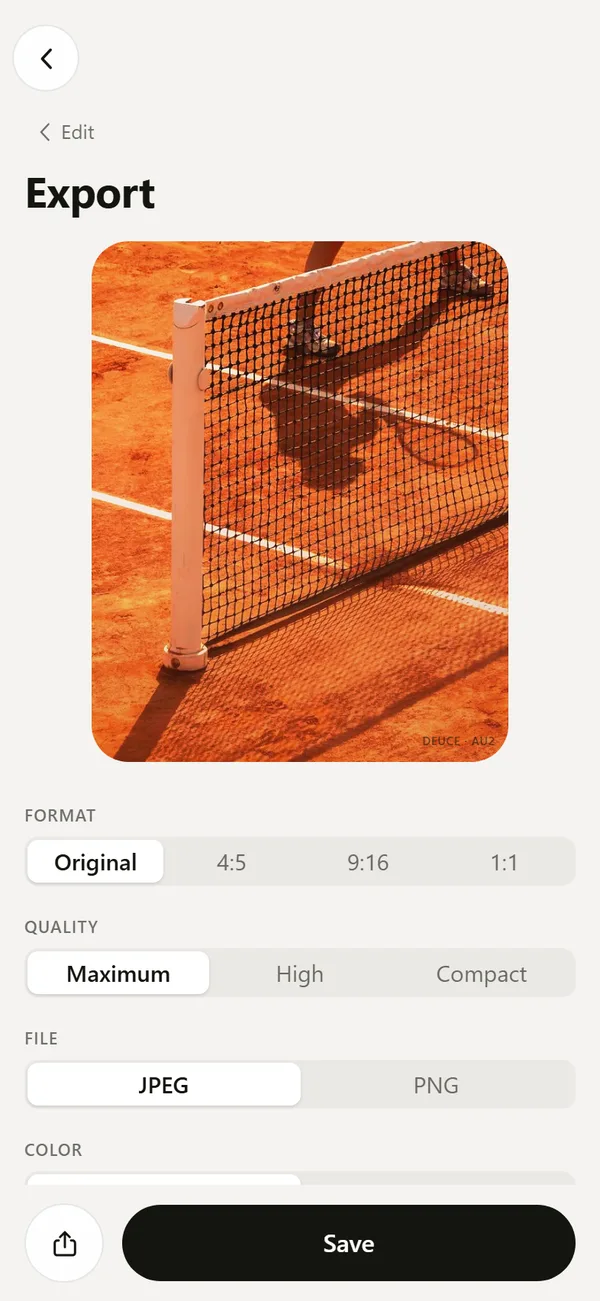
DEUCE builds each exported file from scratch, so only metadata you tick is written. Location is a separate switch on the export screen, and it is off by default. The coordinates are never written unless you turn it on, which differs from tools that copy the file and then delete fields.
EXIF is a second switch. It carries camera make and model, capture date, exposure time, aperture, ISO, focal length and lens model. The app never writes the camera serial number or the embedded thumbnail. After saving, a line on the screen tells you what went in: none, EXIF without coordinates, or EXIF with coordinates. The details are in export and share.
Which method fits which situation?
| Situation | Best method | Changes the original? |
|---|---|---|
| Sending one photo to a friend | Share sheet, Options, Location off | No |
| Posting a set of court photos | Export from an editor with Location off | No |
| Photos you want private for good | Adjust location in Photos | Yes |
| Never saving coordinates again | Camera set to Never | Affects new photos |
How do you check that a file is clean?
Do not trust the toggle until you test it once.
- Send the exported photo to yourself, or save it to Files.
- Open it in Photos and swipe up. A photo with a location shows a map and a place name.
- If the map is missing, the coordinates are gone. If the camera details still show, that is the EXIF block and not the position.
When should you keep location on?
Keep it for files you hold for yourself: a travel archive, a round of golf you want to place on a map later, prints with the place noted. Public posts rarely need it. Anyone who sees a precise tag on a court or a home can find it, so decide per file, not per phone. The privacy page explains how DEUCE treats location for sunrise timing, which stays on the device.
What about photos you already posted?
If a picture is already online with a location tag, deleting it from your phone does nothing. Remove the post, or edit the post to remove the place, then upload a clean copy. Search engines and other people may have copied the original, so remove the data before you post, not after.
Apps like Instagram also let you add a location tag by choice. That tag is separate from the GPS data in the file. A photo can carry one, both or neither.
Which situations are riskiest?
Think about who sees the photo and what a precise point reveals.
- Pictures taken at home, at school or at a gym you attend on a routine.
- Photos of children, where a playground or a team field can be identified.
- Pictures posted in real time, which show where you are right now.
- Photos sold or sent to strangers, such as listings on a marketplace.
- Club photos, where one tagged photo can place a private court or course.
How do you send photos by email or as a file?
Sharing as a file keeps all metadata unless you remove it first. In the share sheet, use Options and turn Location off before you choose Mail or Files. If you have already attached the photo, remove it and attach the clean copy. For a batch, select the photos in Photos, tap Share, and set the toggle once for the whole group.
Does AirDrop send location?
AirDrop sends the original file by default, so the coordinates travel with it. The Options toggle in the share sheet applies to AirDrop as well, so switch it off if the other person does not need the place.
A simple routine you can keep
- Keep Camera location on if you value maps in your library.
- Before any public post, export or share a clean copy with Location off.
- Open the copy and check that the map line is missing.
- Delete the temporary copy after it is posted if you do not need it.
Why not just crop the photo?
Cropping changes what people see and does not touch the metadata. The position stays in the file until something removes it, so a tightly cropped picture still carries the exact coordinates unless you strip them. Treat cropping and metadata as two separate jobs.
Frequently asked questions
Does removing location from a photo reduce quality?
No. Location is metadata, and the pixels stay the same.
Can I remove location from many photos at once on iPhone?
In the share sheet you can select several photos and switch Location off under Options, which strips it from the copies you send.
Does a screenshot have location data?
A screenshot normally has no GPS coordinates, so it can serve as a quick workaround, at the cost of resolution.
Will DEUCE add my location to exported photos?
Not by default. Location is a separate switch on the export screen and it is off unless you turn it on.
Does the Camera app need location access?
No. The camera works without it. Location only adds coordinates to the photo.
Keep exploring
Export Film Photos with Optional EXIF and LocationJPEG or PNG, optional EXIF, no location by default, optional mark.DEUCE Privacy PolicyNo accounts, no server, no ads, no analytics. Photos stay on your phone.What Is EXIF Data in a Photo? A Plain GuideWhat EXIF stores, how to view it on iPhone, and which fields matter for privacy.DEUCE SupportAnswers about rolls, sunrise, permissions, purchases and export.